
The Clarify integration requires a Kondo Business plan and a Clarify workspace where you have an Admin role.
Overview
The Kondo <> Clarify integration allows you to- Sync DMs to the contact activity feed as a single aggregated comment on the matching Clarify person
- Sync fields from Kondo such as labels, notes, and URL to Clarify contact properties (
kondo_*) - Add links to Clarify and other Clarify fields to the Kondo side panel
Configuration
- To connect Kondo to Clarify, go to Settings -> Integrations -> Clarify or click this link to connect and authenticate with a Clarify admin account
-
Configure mapping for Kondo -> Clarify
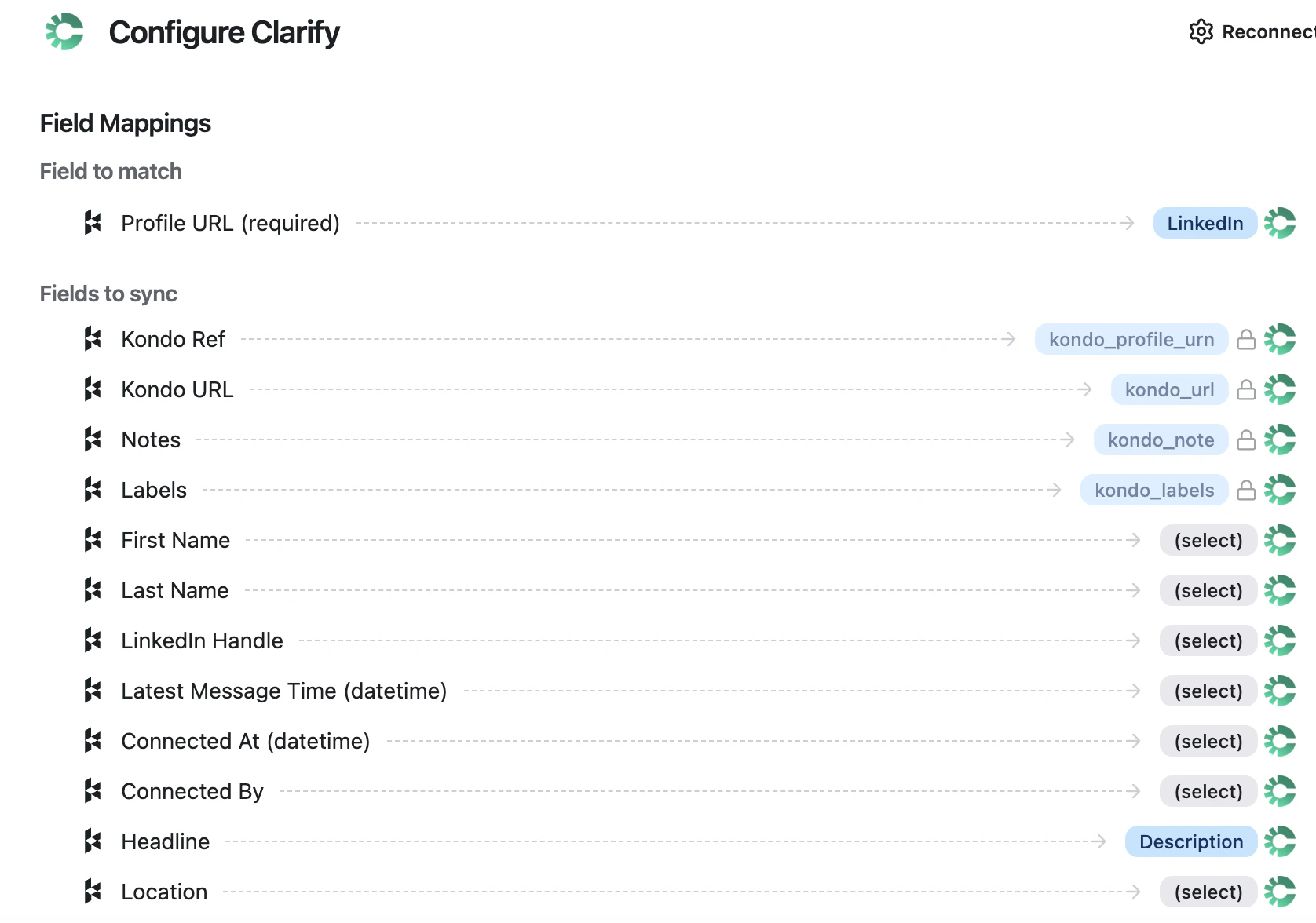
- Records in Kondo are matched to Clarify contacts by LinkedIn URL (the Kondo UI labels this field “Profile URL”; it maps to Clarify’s “LinkedIn” field).
- Toggle ‘Sync Messages’ to add DMs to the Clarify activity feed. If you leave this toggled off, only fields will sync.
- Note on message syncing:
- DM chats sync as a single read-only comment headed
LinkedIn conversation with [handle] (Synced by Kondo, read-only)containing the full conversation history. Each message is timestamped in the format[YYYY-MM-DD HH:MM AM/PM] Sender Name: message body - When new messages arrive on a previously-synced conversation, the existing comment updates in place and the contact moves to the top of the activity feed
- DM chats sync as a single read-only comment headed
- Note on message syncing:
- Toggle ‘Create contacts if not found’ to create a new Clarify person when no LinkedIn URL match exists.
- Set sync frequency. We recommend starting with Manual only until you’re comfortable with what lands in Clarify.
- Manual only — sync runs only when you click ⚡ Sync conversation history on a chat
- Auto-sync labeled — only conversations that have at least one Kondo label push automatically; unlabeled conversations never sync
- All conversations — every Kondo conversation pushes automatically, including new ones as they start
- Default Kondo -> Clarify field mappings are locked:
Kondo Ref → kondo_profile_urn,Kondo URL → kondo_url,Notes → kondo_note,Labels → kondo_labels. Thesekondo_*fields are auto-created on your Clarify contacts the first time the integration syncs, along with a Kondo Comment ID field. - Edit optional field mapping below to map additional Kondo properties to Clarify fields. Headline and Profile Picture map to Clarify’s Description and Avatar by default; other fields (first name, last name, LinkedIn handle, latest message time, connected at, connected by, location, synced by email) default to unmapped. Clarify’s enrichment fills name, company, and title once it has the LinkedIn URL, so most workspaces leave name fields unmapped.
-
Configure fields to pull from Clarify -> Kondo
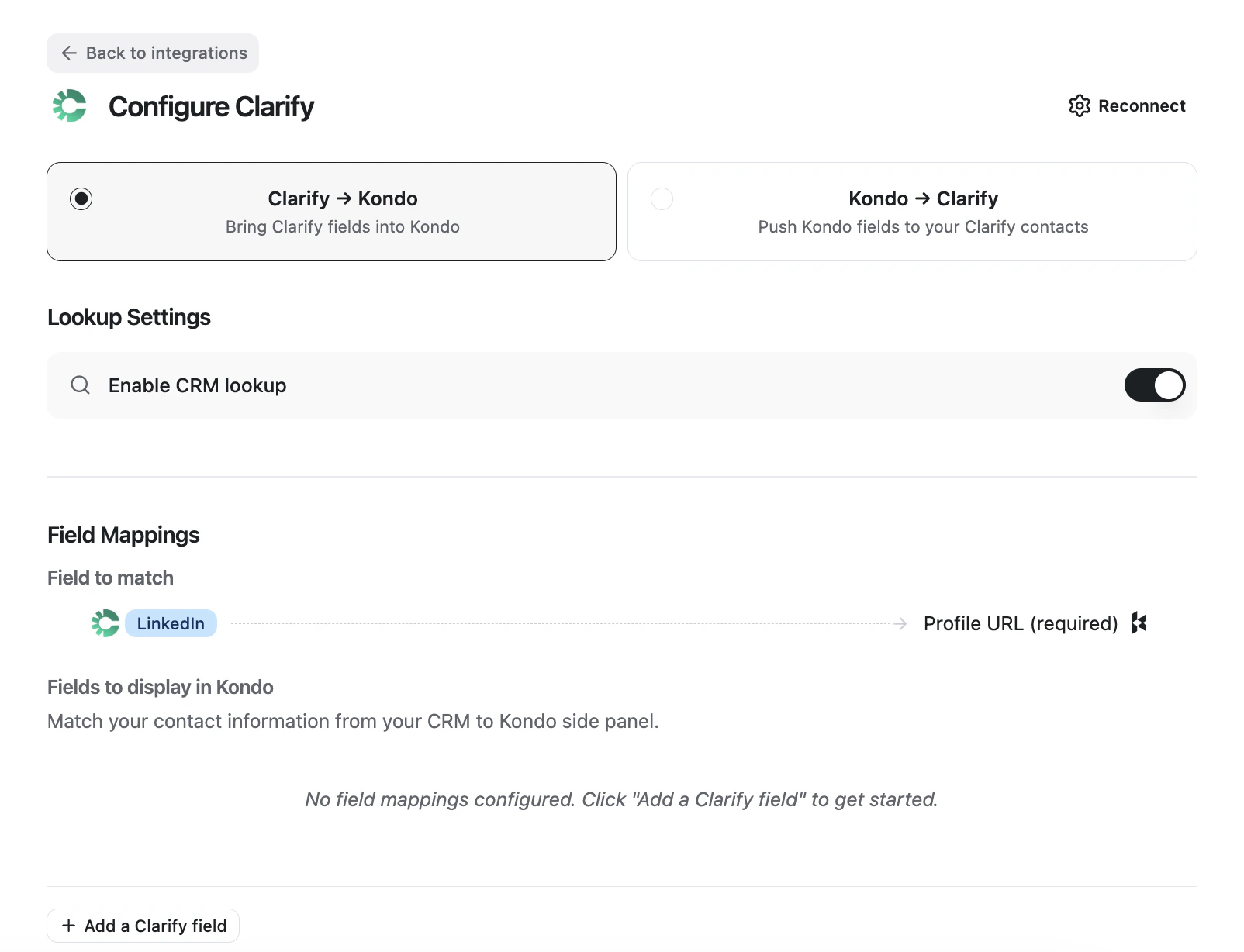
- Switch to the Clarify → Kondo tab at the top of the Configure Clarify screen.
- Toggle Enable CRM lookup (on by default) to surface matching Clarify contact data in the Kondo side panel. With it off, no Clarify data appears in Kondo.
- Records are matched the same way in this direction: Clarify’s LinkedIn field is matched to Kondo’s Profile URL.
- Under Fields to display in Kondo, click + Add a Clarify field to pull additional Clarify person fields into the Kondo side panel. No additional fields are configured by default — the side panel just shows a link to the matched Clarify contact until you add fields here.
Syncing a conversation
- Manual — Open the conversation in Kondo and click ⚡ Sync conversation history at the top right. Once the contact is added to the CRM, an Open in CRM link appears in the right side panel that takes you to the matched contact in Clarify.
- Auto-sync labeled — Apply any Kondo label to the conversation. As long as sync frequency is set to Auto-sync labeled, every labeled conversation pushes automatically; unlabeled ones are skipped.
- All conversations — Set sync frequency to All conversations and every Kondo conversation pushes automatically.
Things to know
- Synced LinkedIn comments are visible to anyone with access to the Clarify contact record. Email and meeting permission controls don’t extend to comments today.
- Synced comments are read-only inside Clarify. To edit or delete, make the change in Kondo and re-sync — the comment can’t be modified directly in Clarify.