Overview
The Kondo <> HubSpot integration allows you to- Sync DMs to the contact activity feed as LinkedIn Message objects
- Sync fields from Kondo such as labels, notes, and URL to HubSpot contact properties
- Add links to HubSpot and other HubSpot fields to the Kondo side panel
Configuration
- To connect Kondo to HubSpot, go to Settings -> Integrations -> HubSpot to connect and authenticate with a HubSpot admin account
-
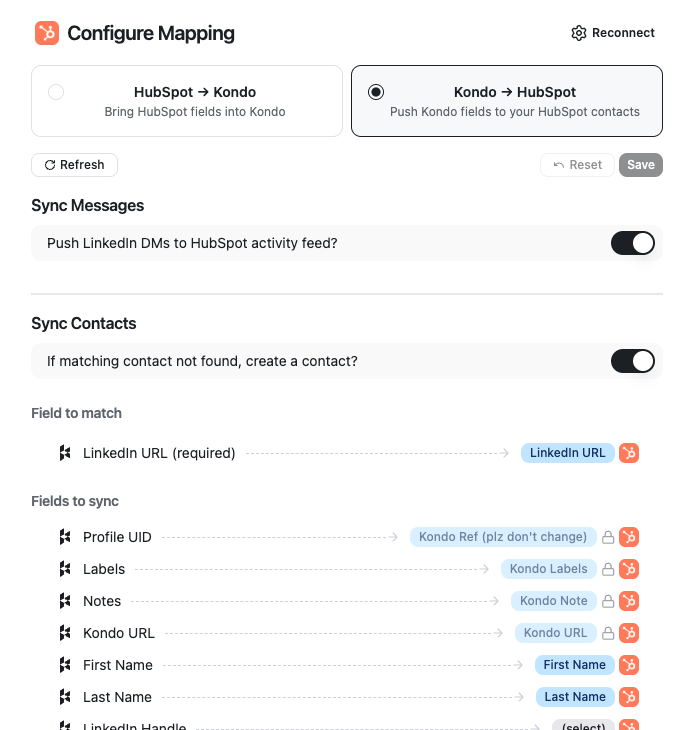
Configure mapping for Kondo -> HubSpot
- We map records in Kondo to HubSpot records by using the contact’s LinkedIn URL as an identifier.
- Toggle ‘Sync Messages’ if you want to add DMs to the activity feed. If you leave this toggled off, only fields will sync.
- Toggle ‘Sync Contacts’ if you want new Contacts to be created if one with a matching LinkedIn URL is not found.
- Edit optional field mapping below if you want to map other Kondo properties to your own HubSpot custom fields
-
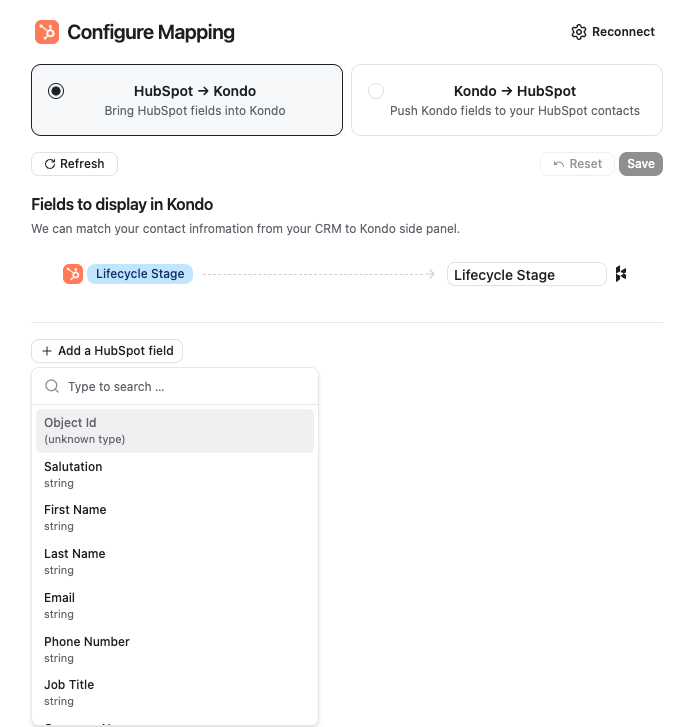
Configure fields to pull from HubSpot -> Kondo
- Kondo will display a link to the matching HubSpot contact in the right side panel by default. You can optionally add additional fields to pull from HubSpot contact records into the Kondo side panel.